How I use herdr tui
These days I run several AI agents in my terminal at once. Keeping track of them, knowing how much context each is using, and keeping them alive when I close my laptop can be difficult. Historically I've used tmux to manage multiple terminal sessions and keep them running after I disconnect. As my job shifts more and more to agentic development I've been looking for a tmux replacement that was more "AI-aware". My research has turned up a few options but recently I've settled on herdr. This post covers what herdr is and a few little plugins I've written for it.
What herdr is
herdr, specifically the herdr tui, is a terminal
workspace manager for AI coding agents. It runs inside your terminal, keeps your
sessions alive, and shows each agent's state, such as working, blocked or done,
in a sidebar. There are two sidebars, spaces and agents, and a central panel
with a tabbed interface. Your terminals are grouped by space and within a space
you use tabs to switch between them. If you open a supported agent within any
space's terminal that agent shows up in the agents sidebar.
By default the spaces sidebar only shows spaces and the agents sidebar only
shows agents. If you have a bunch of tabs opened within a space its only visible
when you have that space focused. The agents side bar however shows all agents
but it's not grouped by space so it's sometimes hard to know which agent goes
with which space. Finally the only way to see how "close" an agent is to
reaching 100% of its context window is by selecting the agent and then looking
at its agent-specific context display. I wrote three plugins to solve these
three problems.
Plugins
herdr draws the sidebars from a layout in its config, and a plugin can fill in
the pieces that layout shows. The three below don't draw anything themselves.
Each writes small pieces of metadata that the sidebar layout displays. They need
herdr 0.9.5 or newer and Node, and are linked in with herdr plugin link.
Three Plugins
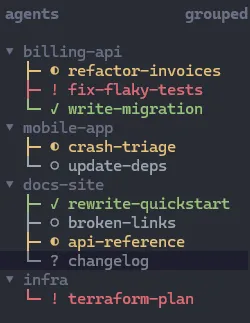
Agents tree
herdr-tui-agents-tree
turns the agents sidebar into a tree: each workspace is a header, and its
agents sit underneath with a status glyph and a colour.
Spaces tree
herdr-tui-spaces-tree
does the same for the spaces sidebar: workspaces named group/name sit under
a heading for their group, and each row ends with a strip of its tabs, one glyph
per tab, marked by the state of that tab's agents.
Here's roughly how it looks:
○ scratch ▫
▾ work (3) !1 ✓1 ◐1
├─ ◐ billing-api ◐!✓▫
  ├─ ! mobile-app !○
  └─ ✓ docs-site ✓○◐?
Agent context
herdr-tui-agents-ctx
shows how much of its context window each agent has used, next to the agent in
the agents sidebar and coloured by threshold. It works with Claude Code and
the Cursor CLI but can easily be extended to add support for other agents.
Here's roughly how it looks:
▾ my-project
├─ ◐ Fix login redirect 34%
├─ ✓ Add export endpoint 62%
└─ ○ Write release notes 91%
Future
herdr-app (a GUI herdr app) has just come out, and I may move over to it at some point. It uses a different backend than the TUI, herdr-core.
I do have a special place in my heart for terminal applications, though, so these plugins aren't going away soon.